





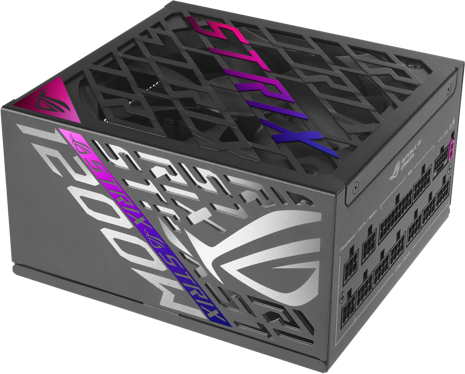


PSU Units are devices that convert electrical power from an outlet into usable power for your computer's components. They ensure your computer runs efficiently and safely. When choosing a PSU, consider wattage, efficiency ratings like 80 Plus, and the number of connectors to match your system’s needs.
PSU Units should match or exceed the total wattage required by all your computer's components. Calculate the combined power draw of your CPU, GPU, and other parts. We recommend adding a 20% buffer to ensure stability and future upgrades.
PSU Units with 80 Plus certification are more energy-efficient, reducing electricity costs and heat output. Levels range from Bronze to Titanium, with higher levels offering better efficiency. Choosing a certified unit can enhance performance and longevity while being environmentally friendly.
PSU Units that are modular allow you to connect only the cables you need, improving airflow and reducing clutter inside your case. While they are typically more expensive, the benefits include easier installation and maintenance, making them ideal for custom builds.
PSU Units must fit within your computer case. Standard sizes include ATX, SFX, and TFX. Measure your case space before purchasing. Ensure compatibility with your motherboard and other components to avoid installation issues.
PSU Units must meet the power demands of gaming PCs, which often require higher wattages due to powerful GPUs and CPUs. Look for units with high efficiency ratings and ample connectors to support gaming hardware for optimal performance.
PSU Units: 3 things to consider before buying
When selecting PSU Units, it's crucial to consider the wattage required by your system. Calculate the total power consumption of your components, including the CPU, GPU, and other peripherals. For example, a high-performance gaming PC with a powerful graphics card might need a 750W PSU Unit or more, while a basic office setup could suffice with 450W. Remember, it's better to have a bit more wattage than you need to ensure stability and accommodate future upgrades.
Efficiency is key when choosing PSU Units because it affects both energy consumption and heat generation. Check for an 80 PLUS certification, which indicates higher efficiency levels. The ratings range from 80 PLUS Bronze to Titanium. A Gold-rated PSU Unit is often a good balance between cost and efficiency for most users. This ensures that less energy is wasted as heat, leading to lower electricity bills and a cooler operating environment.
The form factor of PSU Units should match your computer case and motherboard requirements. ATX is the most common form factor, but always double-check compatibility. Additionally, consider modular or semi-modular PSU Units if you value cable management and airflow within your case. Modular designs allow you to use only the cables you need, reducing clutter and improving airflow for better cooling performance.
Anuncio
PSU Units
- Deals
- Corsair rm850x
- Corsair rm1000x
- 850w psu
- 1000w power supply
- Seasonic modular
- Corsair 1000w
- Corsair rmx
- Be quiet pure power
- Power supply 750w
- 850w power supply
- Power supply unit
- Thermaltake 850w toughpower
- 750w psu
- Asus aura sync
- Thermaltake toughpower gf3
- Corsair 1000
- Corsair 1000w psu gold
- Asus 1000w
- Sf1000
- 750 W PSU Units
- 1000 W PSU Units
- 650 W PSU Units
- 850 W PSU Units
- Seasonic PSU Units
- White PSU Units
- EVGA PSU Units
- Corsair PSU Units
- 500 W PSU Units
- SFX PSU Units
- ATX PSU Units
- Yes (Fully) PSU Units
- Seasonic Gold PSU Units
- Titanium PSU Units
- Be Quiet! PSU Units
- Gold PSU Units
- Seasonic ATX PSU Units
- Corsair Platinum PSU Units
- EVGA Gold PSU Units
- 600 W PSU Units
Una compra de $1,000 podría costar $173.53 al mes durante 6 meses con una TPA del 13.99 %. La tasa varía de 0.00 % a 35.99 % de TPA según la solvencia crediticia, la duración del plazo y está sujeta a aprobación crediticia, resultando, por ejemplo, en 3 pagos mensuales iguales de $333.33 con una TPA del 0.00 % hasta $353.52 con una TPA del 35.99 % por cada $1,000 prestados. Se puede requerir un monto mínimo de compra y un pago inicial. La estimación del pago mensual excluye posibles costos de impuestos y envío. Financiamiento mensual a través de Klarna emitida por WebBank.
Consulta los términos de pago. Es posible que se requiera un pago inicial más alto para algunos consumidores. Préstamos para residentes de CA otorgados o gestionados conforme a una licencia de la Ley de Financiamiento de California. NMLS # 1353190.